Key Takeaways
- OEM support renewals should be evaluated against business risk, not hardware age alone.
- Many enterprise servers, storage arrays, and network devices continue providing value long after vendor lifecycle milestones.
- A renewal quote should be compared against hardware value, replacement cost, downtime exposure, migration plans, and internal support skill.
- Third-party maintenance can help extend the life of stable infrastructure while freeing budget for cloud migration, security, AI, and modernization work.
- A cloud migration should be evaluated when renewal costs are high, workloads are already planned for modernization, or the business wants to reduce long-term data center dependency.
- The best support strategy may include a mix of OEM support, third-party maintenance, cloud migration, hardware refresh, IT asset disposition, and cloud planning.
The renewal process used to be automatic
For years, OEM support renewals were treated like routine maintenance.
The quote arrived. The renewal date was approaching. Procurement approved another year. Servers, storage, networking equipment, and virtualization environments stayed under the same support model because that was the path of least resistance.
That habit is starting to change.

A recent Spiceworks Community discussion among infrastructure professionals raised a question many IT teams are now asking internally: is the value of OEM support still there for aging infrastructure?
The comments were not anti-support. They were more practical than that. Admins shared examples of hardware running reliably for seven to ten years, support renewals that no longer matched replacement economics, VMware environments moving to alternatives such as Proxmox, and cases where risk should be measured with data instead of assumed from the age of the equipment.
There is one more option that belongs in the same conversation: moving the workload to the cloud. If an OEM renewal is expensive enough to trigger a deeper review, IT teams should not only compare OEM support, third-party maintenance, and refresh options. They should also ask whether the workload still belongs on-premises at all.
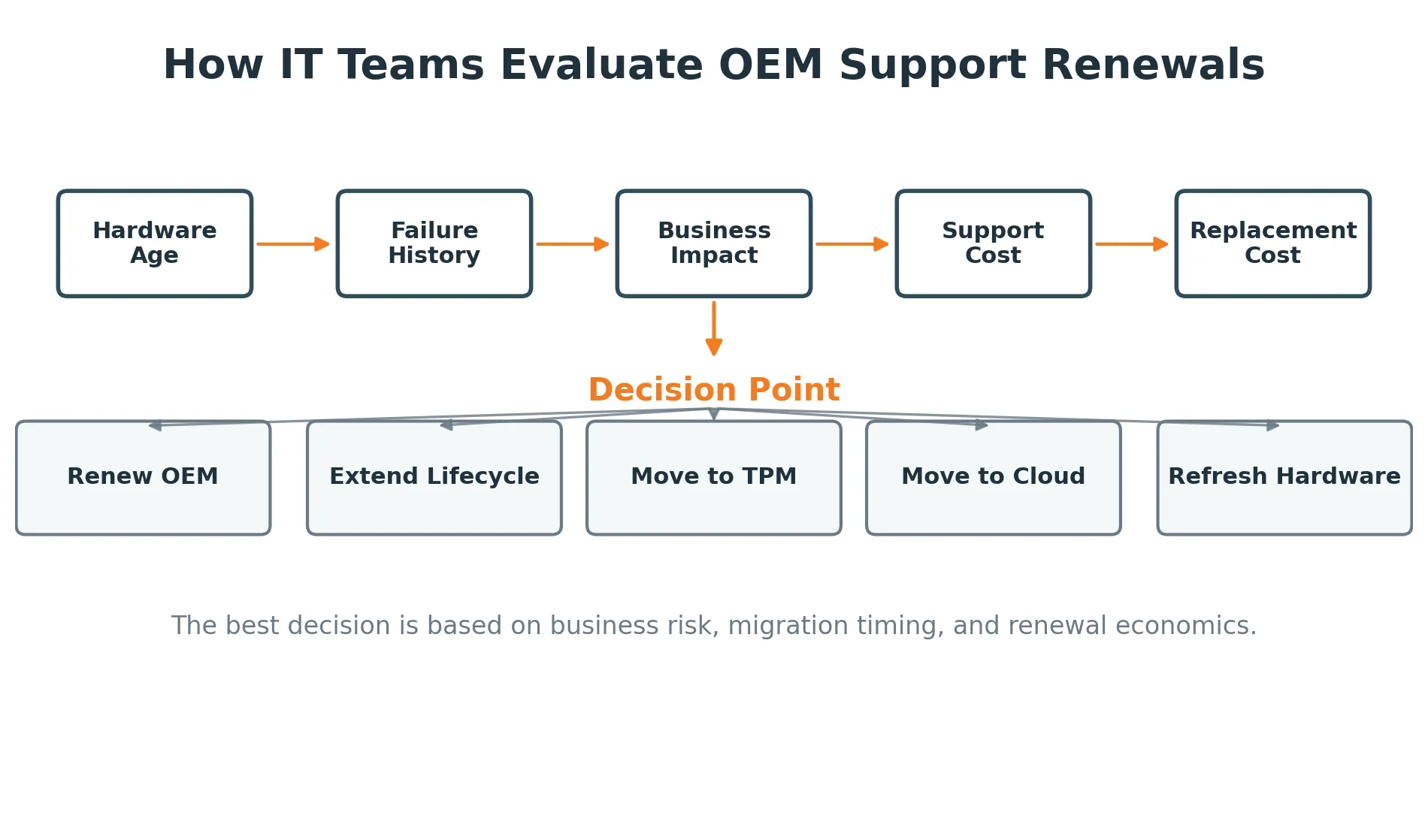
That is the real issue. OEM support can still make sense. But it should not be renewed without asking whether the cost, coverage, and business need still line up.
Hardware age is not the same thing as business risk
A five-year-old server and a ten-year-old server do not carry the same risk in every environment.
Age matters, but it is only one input. Workload type, failure history, parts availability, redundancy, internal expertise, and recovery plans all matter too.
One admin in the forum discussion said they had no issue running servers for seven years, then moving them into dev/test roles where they could still help if replacements had problems. Another noted that seven-plus-year-old servers often did not show issues until after year ten in their experience.
That does not mean every organization should keep production hardware for ten years. It does mean hardware lifecycle decisions should be based on evidence.
If an environment has been stable, has predictable workloads, has usable spares, and has a tested recovery path, the renewal decision may look very different than it would for a fragile production platform running a revenue-critical application.
NIST's contingency planning guidance supports this kind of thinking. It recommends tying systems to the business processes they support and using impact analysis to understand what happens if those systems are unavailable. In other words, support strategy should start with business impact, not a vendor date alone. [1]
The three lifecycle problem
Many IT teams get trapped by one assumption: when the vendor lifecycle ends, the useful life of the hardware ends too.
That is not always true.
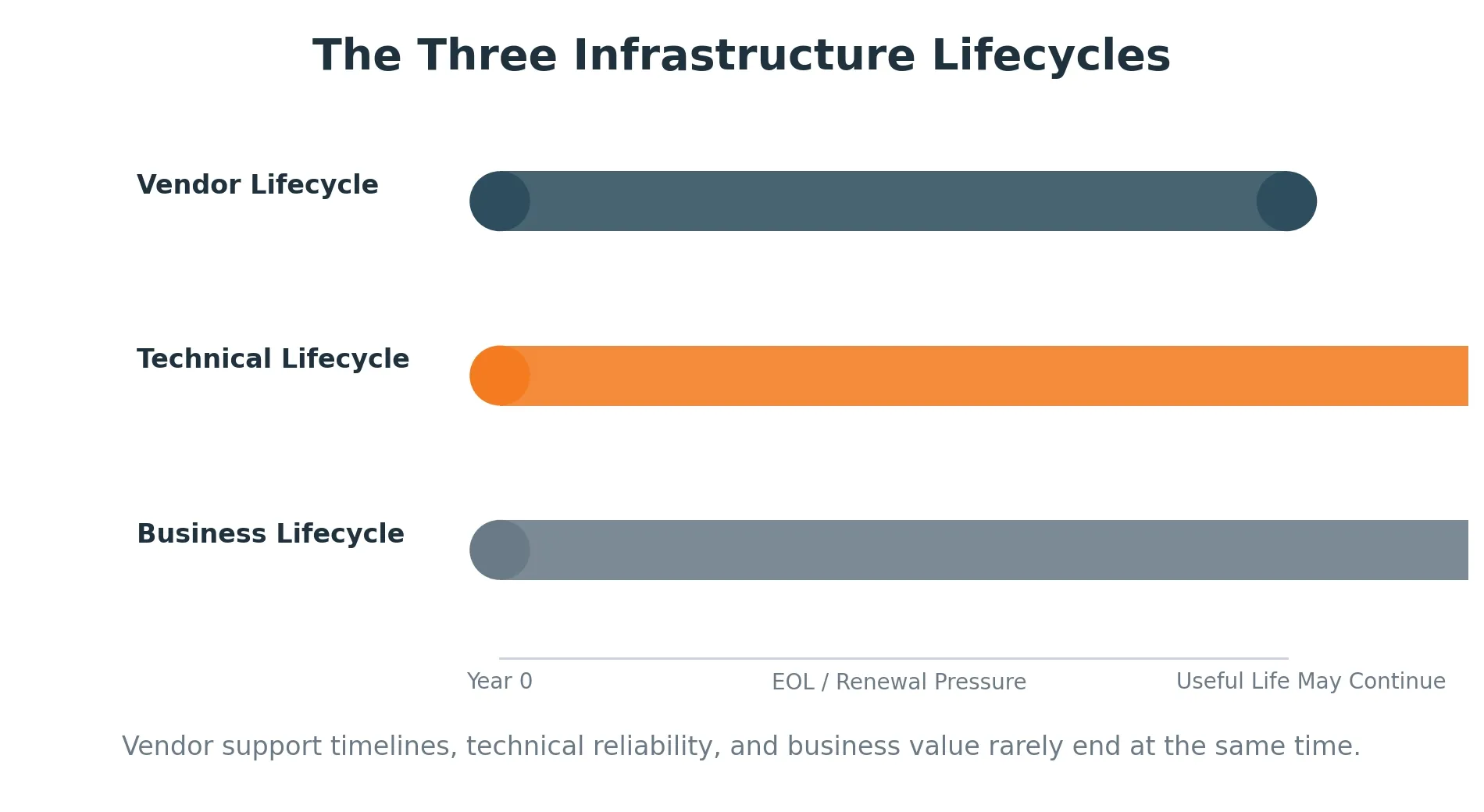
There are usually three timelines at play:
- Vendor lifecycle — when the OEM sells, supports, or updates the product.
- Technical lifecycle — how long the hardware can reliably perform the job.
- Business lifecycle — how long the organization needs the system before migration, refresh, consolidation, or retirement.
Those timelines rarely end on the same date.
A server might reach a vendor milestone while still handling its workload without issue. A storage array might support a stable application that will move to the cloud in 18 months. A Cisco UCS or Dell PowerEdge environment might need support, but not a full OEM renewal tied to a multi-year commitment.
That gap is where money gets wasted. It is also where cloud migration timing becomes important. A workload may not be ready to move today, but if the business already plans to move it within the next one to three years, the support renewal should be treated as a bridge decision rather than a permanent infrastructure decision.
The right question is not, "Is this hardware old?"
The better question is, "What does this hardware need to keep supporting the business until the next planned move?"
When OEM renewal costs stop matching the value of the hardware
One of the strongest points from the Spiceworks discussion came from an IT professional who had replaced a main cluster the previous year, then reviewed renewal costs for other site clusters. They extended one cluster for two more years because the renewal economics did not make sense compared with what newer hardware had recently cost.
That is a common pain point.
As hardware ages, the organization may have already depreciated the asset. Workloads may be stable. Internal teams may know the platform well. Yet the renewal cost can stay high or become harder to justify.
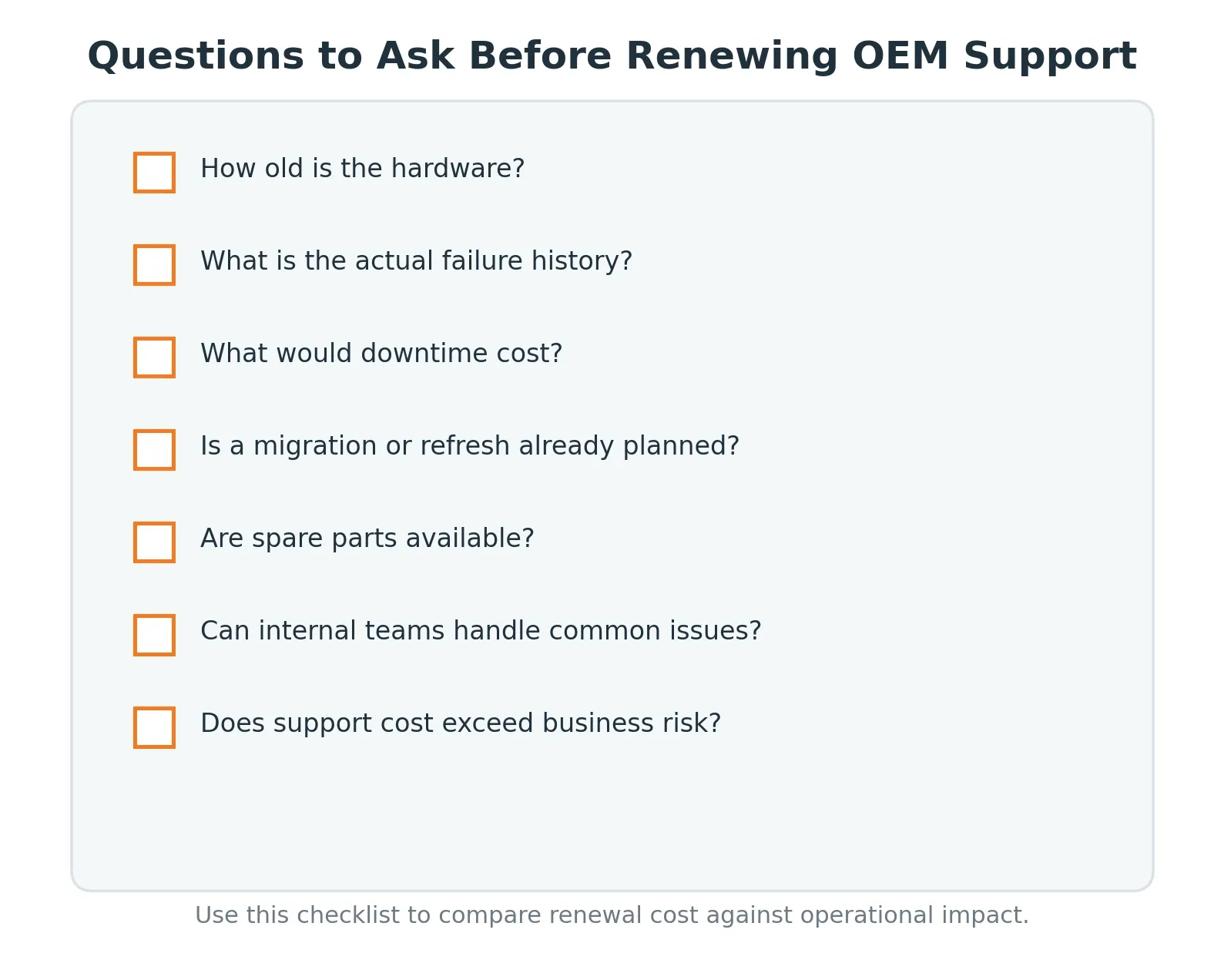
At that point, IT leaders should compare the renewal against the actual decision set:
| Evaluation Area | Question to Ask | Why It Matters |
|---|---|---|
| Hardware health | Has the platform had meaningful failures in the last 24 months? | A stable platform may not need the same coverage level as a troubled one. |
| Business impact | What would one hour of downtime cost? | Critical workloads may justify higher support spend. |
| Renewal cost | How does the OEM renewal compare with replacement cost? | A high renewal may signal it is time to consider other options. |
| Migration plans | Is the workload moving in the next 12–24 months? | Short-term support flexibility may matter more than a long contract. |
| Cloud fit | Is the workload a candidate for AWS migration, rehosting, replatforming, or retirement? | Renewal time is a good forcing function for cloud planning. |
| Internal skill | Can the team troubleshoot common issues? | Experienced teams may need parts and escalation, not premium OEM coverage. |
| Parts availability | Are replacement parts readily available? | Parts access is often more important than the logo on the contract. |
| Support options | Is third-party maintenance available? | TPM can extend useful life without forcing a full refresh. |
The business case should be simple enough to explain to finance. If the support renewal costs more than the risk it reduces, the model needs another look.
Downtime risk still matters
Questioning an OEM renewal does not mean ignoring risk.
Downtime can be expensive, especially when it affects customer-facing systems, supply chain operations, clinical environments, financial workflows, or revenue-generating applications. Uptime Institute's annual outage research continues to analyze outage causes, costs, and business consequences because digital infrastructure failures remain a serious concern. [2]
That is why the decision cannot be based on hardware age alone.
A lightly used internal system may tolerate a different support model than a production database. A dev/test cluster may not need the same SLA as a platform supporting order processing. A storage system supporting regulated data may need stronger controls than a temporary compute host.
The point is not to cut support everywhere.
The point is to align support levels with real risk.
VMware cost pressure is changing the support conversation
The Spiceworks thread also touched on virtualization. One contributor said their organization saved a significant amount on VM licensing by moving from VMware to Proxmox.
That reflects a larger change in infrastructure planning. Many IT teams are reviewing VMware licensing, support needs, migration timing, and the cost of keeping on-premises environments running while cloud or platform decisions are still being made.
For ReluTech readers, this is a natural place to connect to vmCovered, ReluTech's third-party VMware support and migration service. It gives organizations support for perpetually licensed VMware environments while they plan their next move.
The same idea applies to hardware. Teams may not be ready to refresh. They may not be ready to migrate. But they still need support that matches the transition period.
Moving to the cloud should be evaluated before signing another renewal
OEM renewal pressure can be a useful trigger for cloud planning.
That does not mean every aging workload should immediately move to AWS. Some systems should remain on-premises. Some should be refreshed. Some should be retired. Others may be strong candidates for cloud migration if the business wants more flexibility, better scalability, or less dependence on aging data center assets.

AWS Prescriptive Guidance describes seven common migration strategies: retire, retain, rehost, relocate, repurchase, replatform, and refactor or re-architect. That model is useful because it reminds IT teams that cloud migration is not one decision. It is a set of workload-specific decisions. [5]
For example:
| Workload Situation | Cloud Path to Consider | Support Implication |
|---|---|---|
| The application is no longer needed. | Retire | Avoid renewing support for infrastructure tied to dead or duplicate workloads. |
| The workload must stay on-premises for now. | Retain | Use OEM or third-party support based on risk and timeline. |
| The workload can move with limited changes. | Rehost or relocate | Use flexible support to bridge the migration window. |
| The application needs modernization. | Replatform or refactor | Compare renewal cost against the value of modernizing now. |
| A SaaS option replaces the system. | Repurchase | Plan decommissioning, ITAD, and value recovery for retired hardware. |
AWS also offers the Migration Acceleration Program, which is designed to help organizations plan and accelerate cloud migration using an outcome-driven methodology. [6]
For ReluTech, this creates a strong connection point. An aging infrastructure renewal can become the moment where the business reviews support costs, hardware value, migration readiness, and decommissioning needs together. ReluTech's Data Center to AWS Migration Checklist and VMware to AWS migration content can support that next step.
Cloud, AI, and security budgets are competing for the same dollars
OEM support renewals are not being challenged in a vacuum.
IT budgets are under pressure from cloud spend, security investments, AI initiatives, talent gaps, and modernization work. Flexera's cloud research shows that managing cloud spend remains a major challenge for organizations, with rising SaaS and cloud spending creating more pressure on IT finance teams. [3]
Every dollar tied up in an aging infrastructure renewal is a dollar that cannot go toward migration, security, automation, application modernization, or talent.
This is why infrastructure support should be part of a broader cost strategy.
If the business plans to migrate a workload in 18 months, it may not make sense to renew a full OEM contract for a longer term. If the renewal is expensive enough to reopen the business case, cloud migration should be part of the option set, not a separate project discussed later. If a refresh is planned but delayed by budget, third-party maintenance may help keep the environment protected until funding is approved. If old hardware still has market value, IT asset disposition or hardware buyback may help fund the next move.
ReluTech's third-party maintenance, IT asset disposition, and deinstallation and removal services are built around that full infrastructure lifecycle.
Sustainability is another reason to rethink automatic refreshes
There is also an environmental side to this decision.
The EPA notes that electronics management can reduce waste, increase reuse, extend product life, support recycling, conserve resources, and reduce costs. [4]
That does not mean every piece of hardware should stay in production longer. Some equipment is inefficient, risky, or no longer aligned to the business.
But when infrastructure is stable and supportable, extending its useful life can be a smart financial and environmental decision.
The key is having a plan for what happens next.
That plan may include third-party maintenance, spare parts, secure data erasure, certified recycling, resale, decommissioning, or migration support. Without that plan, organizations risk paying too much for aging equipment on the front end and losing recoverable value on the back end.
Where third-party maintenance fits
Third-party maintenance is not the answer for every system.
It is a strong fit when the hardware is stable, the organization wants to extend useful life, OEM renewal costs are hard to justify, or the business needs support during a migration or refresh window.
ReluTech's Elastic Maintenance gives organizations support for enterprise hardware from leading OEMs, including Cisco, Dell, HPE, NetApp, EMC, IBM, Brocade, Lenovo, Juniper, Hitachi, and Sun/Oracle.
This can help organizations:
- Reduce maintenance spend on mature infrastructure.
- Extend the useful life of stable hardware.
- Avoid forced refresh timelines.
- Keep hardware supported during cloud migration.
- Buy time to assess AWS migration paths.
- Align support terms to business plans.
- Consolidate multi-vendor support under one provider.
For readers researching specific platforms, ReluTech can internally link this article to:
- Cisco UCS third-party support options
- Dell EOL and EOSL dates
- HPE ProLiant DL360 Gen10 EOL and EOSL dates
- Dell EMC PowerProtect DD6900 EOL and EOSL dates
- VxRail third-party maintenance
- VMware support and migration services
- Data Center to AWS Migration Checklist
- Migrating VMware Workloads to AWS
- IT Asset Disposition services
A practical renewal decision model
Before approving the next OEM renewal, IT and finance teams should run through a decision model like this:
| If this is true | Consider this path |
|---|---|
| The system is mission-critical, under active development, and tightly tied to OEM firmware or engineering support. | Renew OEM support. |
| The hardware is stable, parts are available, and the workload will remain on-premises. | Evaluate third-party maintenance. |
| The workload will migrate within 12–24 months. | Use flexible support to bridge the migration window. |
| The workload is a strong fit for AWS migration. | Compare renewal cost against migration funding, MAP eligibility, and cloud operating model benefits. |
| The renewal is close to replacement cost. | Compare refresh, cloud migration, TPM, and asset resale options. |
| The hardware is no longer needed. | Use ITAD, deinstallation, data erasure, and value recovery. |
| The environment is running VMware while leadership reviews alternatives. | Evaluate VMware support and migration planning through vmCovered. |
This kind of model makes the renewal conversation more useful.
Instead of asking, "Should we renew?" the team can ask, "Which support path best matches the business plan for this asset?"
How ReluTech helps organizations evaluate aging infrastructure
ReluTech helps organizations avoid one-size-fits-all support decisions.
The goal is not to push every asset into the same support model. The goal is to understand which assets should be renewed, which should be moved to third-party maintenance, which should move to AWS, which should be sold, which should be decommissioned, and which should be used to support a cloud migration plan.
That can include:
- Elastic Maintenance for flexible third-party hardware support.
- vmCovered for VMware support and migration planning.
- Cloud migration planning to determine whether the workload should be retained, rehosted, relocated, replatformed, retired, or replaced.
- IT Asset Disposition for secure decommissioning, data erasure, recycling, and value recovery.
- Deinstallation and removal for data center exit projects.
- EOL and EOSL tracking to help teams see where assets stand in their lifecycle.
- Hardware lifecycle planning to connect support decisions to migration, refresh, and budget timing.
The best outcome is not always the cheapest support contract.
The best outcome is the support plan that protects the business without wasting money on coverage the environment does not need.
FAQ
What is an OEM support renewal?
An OEM support renewal is the process of extending a support contract with the original equipment manufacturer for servers, storage, networking equipment, or software. It may include parts replacement, technical support, firmware access, and service-level agreements.
Why are IT teams questioning OEM support renewals?
IT teams are questioning OEM support renewals because mature infrastructure often remains stable after the original warranty or support period. When renewal costs rise or approach replacement economics, teams start comparing OEM support against third-party maintenance, refresh plans, migration timelines, and downtime risk.
How long can enterprise servers last?
Many enterprise servers can remain operational for seven to ten years or longer when properly maintained. Useful life depends on workload, environment, component health, redundancy, and business risk.
When does OEM support still make sense?
OEM support can make sense for newer systems, mission-critical platforms, active firmware-dependent environments, or hardware tied to specific vendor engineering support. It may also be preferred when the cost of downtime greatly exceeds the cost of coverage.
What is third-party maintenance?
Third-party maintenance is hardware support provided by a company other than the original equipment manufacturer. It can include replacement parts, technical support, service-level agreements, and multi-vendor coverage for post-warranty or aging infrastructure.
Can third-party maintenance support end-of-life hardware?
Yes. Third-party maintenance providers often support equipment after it reaches OEM end-of-life or end-of-service-life milestones. This can help organizations extend hardware life, reduce support costs, and avoid rushed refresh decisions.
Should cloud migration be considered before renewing OEM support?
Yes. If a renewal is expensive, the hardware is aging, or the workload is already part of a modernization plan, cloud migration should be evaluated before signing another long-term support contract. The answer may still be to retain the workload on-premises, but renewal time is a natural point to compare OEM support, third-party maintenance, refresh, cloud migration, and retirement options.
How should organizations decide whether to renew OEM support?
Organizations should compare renewal cost against business risk, downtime impact, replacement cost, failure history, spare parts availability, internal expertise, and migration plans. The decision should be based on the role the asset plays in the business, not the renewal date alone.
Sources
- NIST SP 800-34 Rev. 1, Contingency Planning Guide for Federal Information Systems: https://csrc.nist.gov/pubs/sp/800/34/r1/upd1/final
- Uptime Institute, Annual Outage Analysis 2024: https://uptimeinstitute.com/resources/research-and-reports/annual-outage-analysis-2024
- Flexera, 2026 State of the Cloud Report: https://info.flexera.com/CM-REPORT-State-of-the-Cloud
- U.S. EPA, Electronics Basic Information, Research, and Initiatives: https://www.epa.gov/electronics-batteries-management/electronics-basic-information-research-and-initiatives
- AWS Prescriptive Guidance, About the migration strategies: https://docs.aws.amazon.com/prescriptive-guidance/latest/large-migration-guide/migration-strategies.html
- AWS Migration Acceleration Program: https://aws.amazon.com/migration-acceleration-program/
